
ナンバーリンク(パズル)を解くVBAに挑戦№3
では、そもそもどこが無駄なのでしょうか・・・

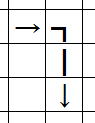
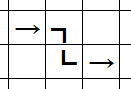
chkAdvance
では、これを組み込んだコードです。
      Option Explicit


Private SuAry(1 To 10, 1 To 10) As String


Sub main()

  Dim iR As Integer

  Dim iC As Integer


  For iR = 1 To 10

    For iC = 1 To 10

      With Cells(iR + 1, iC + 1)

        If .Value = "" Or Not IsNumeric(.Value) Then

          .Value = ""

          .Font.Size = 9

          .Font.Bold = False

          .NumberFormat = "@"

          SuAry(iR, iC) = ""

        Else

          SuAry(iR, iC) = .Value

        End If

      End With

    Next

  Next


  iR = 1

  iC = 0

  Call getStart(iR, iC)

  Do

    If getAdvance(iR, iC, iR, iC, 0) = "完了" Then

      Exit Do

    End If

  Loop

  Range("B2:K11").Value = SuAry

End Sub


Private Function getAdvance(ByVal iR As Integer, ByVal iC As Integer, _

              ByVal iR2 As Integer, ByVal iC2 As Integer, _

              ByVal tryCnt As Integer) As String

  Dim iR3 As Integer

  Dim iC3 As Integer

  Dim iR4 As Integer

  Dim iC4 As Integer

  Dim i As Integer

  Dim rtn As String


  Call getEnd(iR4, iC4, SuAry(iR, iC))

  Select Case True

    Case iR4 = iR2 - 1 And iC4 = iC2, _

       iR4 = iR2 And iC4 = iC2 + 1, _

       iR4 = iR2 + 1 And iC4 = iC2, _

       iR4 = iR2 And iC4 = iC2 - 1

      Call dispCell(True)

      tryCnt = 0

      If getStart(iR, iC) = False Then

        getAdvance = "完了"

        Exit Function

      End If

      rtn = getAdvance(iR, iC, iR, iC, tryCnt)

      Select Case rtn

        Case "完了"

          getAdvance = "完了"

          Exit Function

        Case "終点"

          getAdvance = "終点"

          tryCnt = 0

          If getStart(iR, iC) = False Then

            getAdvance = "完了"

            Exit Function

          End If

        Case "破綻"

          getAdvance = "破綻"

          Exit Function

      End Select

  End Select


  For i = 1 To 4

    Select Case True

      Case iR4 > iR2 And iC4 > iC2

        Select Case i

          Case 1

            iR3 = iR2 + 1

            iC3 = iC2

          Case 2

            iR3 = iR2

            iC3 = iC2 + 1

          Case 3

            iR3 = iR2 - 1

            iC3 = iC2

          Case 4

            iR3 = iR2

            iC3 = iC2 - 1

        End Select

      Case iR4 > iR2 And iC4 <= iC2

        Select Case i

          Case 1

            iR3 = iR2 + 1

            iC3 = iC2

          Case 2

            iR3 = iR2

            iC3 = iC2 - 1

          Case 3

            iR3 = iR2

            iC3 = iC2 + 1

          Case 4

            iR3 = iR2 - 1

            iC3 = iC2

        End Select

      Case iR4 < iR2 And iC4 > iC2

        Select Case i

          Case 1

            iR3 = iR2 - 1

            iC3 = iC2

          Case 2

            iR3 = iR2

            iC3 = iC2 + 1

          Case 3

            iR3 = iR2 + 1

            iC3 = iC2

          Case 4

            iR3 = iR2

            iC3 = iC2 - 1

        End Select

      Case iR4 = iR2 And iC4 > iC2

        Select Case i

          Case 1

            iR3 = iR2

            iC3 = iC2 + 1

          Case 2

            iR3 = iR2

            iC3 = iC2 - 1

          Case 3

            iR3 = iR2 - 1

            iC3 = iC2

          Case 4

            iR3 = iR2 + 1

            iC3 = iC2

        End Select

      Case iR4 < iR2 And iC4 <= iC2

        Select Case i

          Case 1

            iR3 = iR2 - 1

            iC3 = iC2

          Case 2

            iR3 = iR2

            iC3 = iC2 - 1

          Case 3

            iR3 = iR2 + 1

            iC3 = iC2

          Case 4

            iR3 = iR2

            iC3 = iC2 + 1

        End Select

      Case iR4 = iR2 And iC4 <= iC2

        Select Case i

          Case 1

            iR3 = iR2

            iC3 = iC2 - 1

          Case 2

            iR3 = iR2

            iC3 = iC2 + 1

          Case 3

            iR3 = iR2 - 1

            iC3 = iC2

          Case 4

            iR3 = iR2 + 1

            iC3 = iC2

        End Select

    End Select


    If iC3 >= 1 And iC3 <= 10 And iR3 >= 1 And iR3 <= 10 Then

      If chkAdvance(iR3, iC3, SuAry(iR, iC)) = True Then

        If SuAry(iR3, iC3) = "" Then

          tryCnt = tryCnt + 1

          Call dispCell(True, iR3, iC3, SuAry(iR, iC) & "-" & tryCnt)

          rtn = getAdvance(iR, iC, iR3, iC3, tryCnt)

          Select Case rtn

            Case "完了"

              getAdvance = "完了"

              Exit Function

          End Select

          If Not IsNumeric(SuAry(iR3, iC3)) Then

            tryCnt = tryCnt - 1

            Call dispCell(True, iR3, iC3, "")

          End If

        End If

      End If

    End If

  Next

  If IsNumeric(SuAry(iR2, iC2)) Then

    getAdvance = "破綻"

  Else

    tryCnt = tryCnt - 1

    Call dispCell(True, iR2, iC2, "")

    getAdvance = "別ルート探索"

  End If

End Function


Private Function chkAdvance(ByVal iR As Integer, ByVal iC As Integer, ByVal i As Integer) As Boolean

  Dim cnt As Integer

  cnt = 0

  If iR <> 1 And iC <> 1 Then

    If InStr(SuAry(iR - 1, iC - 1), i & "-") > 0 Or SuAry(iR - 1, iC - 1) = CStr(i) Then

      cnt = cnt + 1

    End If

    If InStr(SuAry(iR - 1, iC), i & "-") > 0 Or SuAry(iR - 1, iC) = CStr(i) Then

      cnt = cnt + 1

    End If

    If InStr(SuAry(iR, iC - 1), i & "-") > 0 Or SuAry(iR, iC - 1) = CStr(i) Then

      cnt = cnt + 1

    End If

    If cnt >= 3 Then

      chkAdvance = False

      Exit Function

    End If

  End If


  cnt = 0

  If iR <> 10 And iC <> 1 Then

    If InStr(SuAry(iR + 1, iC - 1), i & "-") > 0 Or SuAry(iR + 1, iC - 1) = CStr(i) Then

      cnt = cnt + 1

    End If

    If InStr(SuAry(iR + 1, iC), i & "-") > 0 Or SuAry(iR + 1, iC) = CStr(i) Then

      cnt = cnt + 1

    End If

    If InStr(SuAry(iR, iC - 1), i & "-") > 0 Or SuAry(iR, iC - 1) = CStr(i) Then

      cnt = cnt + 1

    End If

    If cnt >= 3 Then

      chkAdvance = False

      Exit Function

    End If

  End If


  cnt = 0

  If iR <> 1 And iC <> 10 Then

    If InStr(SuAry(iR - 1, iC + 1), i & "-") > 0 Or SuAry(iR - 1, iC + 1) = CStr(i) Then

      cnt = cnt + 1

    End If

    If InStr(SuAry(iR - 1, iC), i & "-") > 0 Or SuAry(iR - 1, iC) = CStr(i) Then

      cnt = cnt + 1

    End If

    If InStr(SuAry(iR, iC + 1), i & "-") > 0 Or SuAry(iR, iC + 1) = CStr(i) Then

      cnt = cnt + 1

    End If

    If cnt >= 3 Then

      chkAdvance = False

      Exit Function

    End If

  End If


  cnt = 0

  If iR <> 10 And iC <> 10 Then

    If InStr(SuAry(iR + 1, iC + 1), i & "-") > 0 Or SuAry(iR + 1, iC + 1) = CStr(i) Then

      cnt = cnt + 1

    End If

    If InStr(SuAry(iR + 1, iC), i & "-") > 0 Or SuAry(iR + 1, iC) = CStr(i) Then

      cnt = cnt + 1

    End If

    If InStr(SuAry(iR, iC + 1), i & "-") > 0 Or SuAry(iR, iC + 1) = CStr(i) Then

      cnt = cnt + 1

    End If

    If cnt >= 3 Then

      chkAdvance = False

      Exit Function

    End If

  End If

  chkAdvance = True

End Function


Private Sub dispCell(ByVal blnDisp As Boolean, _

           Optional ByVal iR As Integer = 0, Optional ByVal iC As Integer = 0, _

           Optional ByVal dispStr As String = "")

  If iR = 1 And iC = 9 And dispStr = "1-1" Then

    DoEvents

  End If

  If iR <> 0 And iC <> 0 Then

    SuAry(iR, iC) = dispStr

  End If

  If blnDisp = True Then

    Range("B2:K11").Value = SuAry

    DoEvents

  End If

End Sub


Private Function getStart(ByRef iR As Integer, ByRef iC As Integer) As Boolean

  iC = iC + 1

  If RowColAjust(iR, iC) = False Then

    getStart = False

    Exit Function

  End If


  Do

    If IsNumeric(SuAry(iR, iC)) Then

      If chkEnd(iR, iC) <> True Then

        getStart = True

        Exit Function

      End If

    End If

    iC = iC + 1

    If RowColAjust(iR, iC) = False Then

      getStart = False

      Exit Function

    End If

  Loop

End Function


Private Function RowColAjust(ByRef iR As Integer, ByRef iC As Integer) As Boolean

  If iC > 10 Then

    iR = iR + 1

    iC = 1

  End If

  If iR > 10 Then

    RowColAjust = False

    Exit Function

  End If

  RowColAjust = True

End Function


Private Function chkEnd(ByVal iR As Integer, ByVal iC As Integer) As Boolean

  Dim iR2 As Integer

  Dim iC2 As Integer


  Call getEnd(iR2, iC2, SuAry(iR, iC))


  If iR2 = iR And iC2 = iC Then

    chkEnd = True

  Else

    chkEnd = False

  End If

End Function


Private Sub getEnd(ByRef iR2 As Integer, ByRef iC2 As Integer, ByVal i As String)

  iR2 = 10

  iC2 = 10

  Do

    If SuAry(iR2, iC2) = i Then

      Exit Sub

    End If

    iC2 = iC2 - 1

    If iC2 < 1 Then

      iR2 = iR2 - 1

      iC2 = 10

    End If

    If iR2 < 1 Then

      Exit Sub

    End If

  Loop

End Sub
だいぶ、それらしい動きになってきました。
ナンバーリンク(パズル)を解くVBAに挑戦 : №1 №2 №3 №4 №5 №6 №7 №8
同じテーマ「マクロVBAサンプル集」の記事
アメブロの記事本文をVBAでバックアップする№1
数独(ナンプレ)を解くVBAに挑戦№1
数独(ナンプレ)を解くアルゴリズムの要点とパフォーマンスの検証№1
ナンバーリンク(パズル)を解くVBAに挑戦№1
ナンバーリンクを解くVBAのパフォーマンス改善№1
オセロを作りながらマクロVBAを学ぼう
他ブックへのリンクエラーを探し解除
Excelシートの複雑な計算式を解析するVBA
Excel将棋:マクロVBAの学習用(№1)
Excel囲碁:万波奈穂先生に捧ぐ
Excel囲碁:再起動後も続けて打てるように改造
新着記事NEW ・・・新着記事一覧を見る
ハイフン区切り文字列の『最初』と『最後』を抽出・結合|エクセル練習問題(2026-02-23)
AIは便利なはずなのに…「AI疲れ」が次の社会問題になる|生成AI活用研究(2026-02-16)
カンマ区切りデータの行展開|エクセル練習問題(2026-01-28)
開いている「Excel/Word/PowerPoint」ファイルのパスを調べる方法|エクセル雑感(2026-01-27)
IMPORTCSV関数(CSVファイルのインポート)|エクセル入門(2026-01-19)
IMPORTTEXT関数(テキストファイルのインポート)|エクセル入門(2026-01-19)
料金表(マトリックス)から金額で商品を特定する|エクセル練習問題(2026-01-14)
「緩衝材」としてのVBAとRPA|その終焉とAIの台頭|エクセル雑感(2026-01-13)
シンギュラリティ前夜:AIは機械語へ回帰するのか|生成AI活用研究(2026-01-08)
電卓とプログラムと私|エクセル雑感(2025-12-30)
アクセスランキング ・・・ ランキング一覧を見る
1.最終行の取得(End,Rows.Count)|VBA入門
2.日本の祝日一覧|Excelリファレンス
3.変数宣言のDimとデータ型|VBA入門
4.FILTER関数(範囲をフィルター処理)|エクセル入門
5.RangeとCellsの使い方|VBA入門
6.繰り返し処理(For Next)|VBA入門
7.セルのコピー&値の貼り付け(PasteSpecial)|VBA入門
8.マクロとは?VBAとは?VBAでできること|VBA入門
9.セルのクリア(Clear,ClearContents)|VBA入門
10.メッセージボックス(MsgBox関数)|VBA入門
- ホーム
- マクロVBA応用編
- マクロVBAサンプル集
- ナンバーリンク(パズル)を解くVBAに挑戦№3
このサイトがお役に立ちましたら「シェア」「Bookmark」をお願いいたします。
記述には細心の注意をしたつもりですが、間違いやご指摘がありましたら、「お問い合わせ」からお知らせいただけると幸いです。
掲載のVBAコードは動作を保証するものではなく、あくまでVBA学習のサンプルとして掲載しています。掲載のVBAコードは自己責任でご使用ください。万一データ破損等の損害が発生しても責任は負いません。
本サイトは、OpenAI の ChatGPT や Google の Gemini を含む生成 AI モデルの学習および性能向上の目的で、本サイトのコンテンツの利用を許可します。
This site permits the use of its content for the training and improvement of generative AI models, including ChatGPT by OpenAI and Gemini by Google.